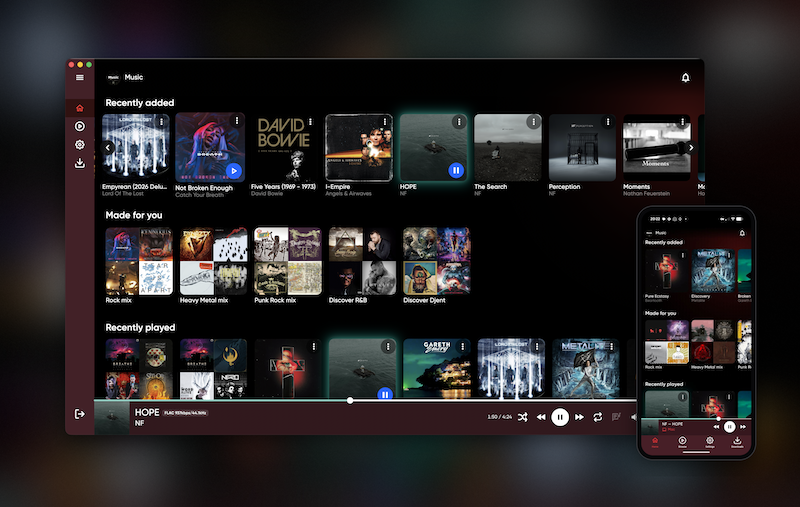
Description
JellyBox Player
A native cross-platform music player for your Jellyfin, Emby or Navidrome server, on macOS, Windows, Linux, iOS and Android, with Apple CarPlay and Android Auto.

JellyBox is a music client for Jellyfin, Emby and Navidrome (other OpenSubsonic-compatible servers may work, but only Navidrome is tested). It does one thing well: it makes your own music library feel like a modern streaming app, with fast browsing, offline downloads and progressive caching, synced lyrics, and Spotify-style everyday mixes. JellyBox also has cloud features like playback-continuity - just like spotify-connect, to move your music playback betwee devices, or remote control them. Relay - to connect remotely to your jellyfin instance without running tailscale, VPN or port forwarding.
Features
Library & browsing
- Connect to Jellyfin, Emby or Navidrome (Subsonic API) servers and switch between them without signing out
- Jellyfin Quick Connect: sign in without typing a password
- Home page with recently played, recently added and personalised mixes
- Genre mixes built from the genres you actually play
- Browse albums, artists, genres, playlists and songs across multiple music libraries
- Unified search, or filter to playlists, albums, artists or songs
- Artist pages with biography and full discography
- Favourites and playlists, synced back to your server
Playback
- Remembers your queue and playback position between restarts
- Time-synced lyrics overlay
- Shuffle, repeat, and a randomised "surprise me" queue
- Per-connection streaming profiles with automatic transcoding when a codec isn't supported natively
- Audio quality badge showing whether you're getting the original file
- ListenBrainz scrobbling for listens and now-playing(including self-hosted instances)
- Landscape now-playing layout on phones
Offline
- Download albums and tracks for offline listening
- Synced download playlists
- Full offline mode, so your downloads still work on a plane
Look & feel
- Colour scheme generated from the current album artwork
- Studio Mode: a full-screen animated playback view
System integration
- Apple CarPlay and Android Auto (beta)
- Cast to DLNA / UPnP renderers (smart TVs, network speakers, receivers)
- ChromeCast
- AirPlay and system output routing on macOS and iOS
- Media keys and global keyboard shortcuts
- Windows media overlay with artwork and transport controls
- MPRIS on Linux (GNOME/KDE media widgets,
playerctl) - Lock screen and notification controls on iOS and Android
Download
| Platform | Where |
|---|---|
| iOS / iPadOS / macOS | App Store |
| Android | Google Play or .apk |
| macOS | Signed & notarized .dmg |
| Windows | Installer .exe or portable .zip |
| Linux | .AppImage, .deb, .rpm, .tar.gz (x64 & arm64) |
Desktop builds and the Android APK are on the GitHub releases page.
Links
- Website: jellybox.app
- Source: github.com/avdept/JellyBoxPlayer
Repository
https://github.com/avdept/JellyBoxPlayerEmbed Badge
Add this badge to your README to link back to your hub page:

Installation Instructions
Download either from appstores, github releases or website
Comments (0)
No comments yet. Be the first to share your thoughts!
Log in to comment

High-availability NVMe VPS to self-host Jellyfin or Emby with 99.9% uptime.
Get started with Onidel


