

Description
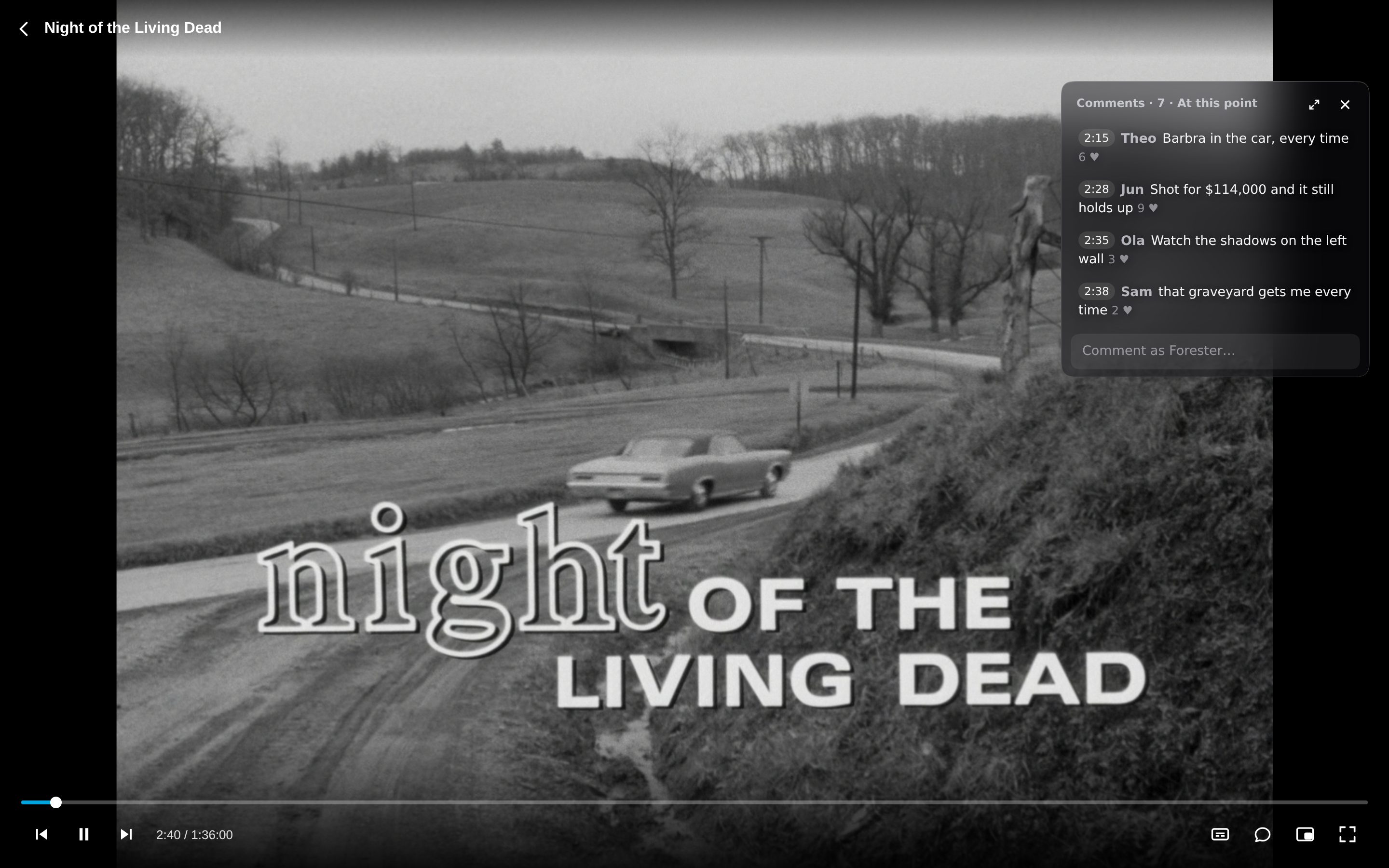
Commentarr adds a shared comment section to Jellyfin, pinned to moments. Watch something on your own server and see what everyone else said at that exact point: the jump scare at 18:25, the cameo at 1:02:10, the ending people argue about. Comments are shared across every Jellyfin server that uses it, matched by the title's TMDB, TVDB or IMDb id, so a 4K remux and a 720p web copy of the same episode share one thread.
Ways to watch with comments
- Bubble (default on phones): one comment at a time pops up as you reach its moment, then fades. Tap it to read more or write your own.
- Overlay: a small live panel in the corner with the latest moments, like a live chat replay.
- Sidebar: the whole conversation beside the video, which shrinks to make room. Sort by Top, New, or By time with a line that follows playback.
- Off: watch in peace.
Features
- Pinned moments: tap the time chip and your comment pops up for everyone at that second. Typed times like 1:02:10 become jump links.
- Replies, likes and live updates without reloading.
- Spoilers: mark a comment as a spoiler and it stays covered until someone chooses to read it. Viewers can also hide everything pinned ahead of them.
- Different cuts: comments remember the length of the file they were written on and say so when your copy differs.
- TV apps: a "Comments" subtitle track for apps that can't show the panel (Android TV, Roku, webOS...), or use your phone as a second screen that follows the TV to the second, with play/pause and jump-to-moment.
- Desktop apps: works in Jellyfin Media Player and Jellyfin Desktop, not only the browser.
- Moderation built in: reports, automatic hiding, banned words, rate limits, and tools for every Jellyfin admin to hide comments, ban their users and set their own word list.
- Private by design: no accounts or sign-up. Your server vouches for you; only a hashed id, a display name and your comments are stored, never anything about your library.
- Open API so other Jellyfin apps can add comments natively.
Free and open source (AGPL-3.0). The shared comment server is comments.forester.dev, and it can be self-hosted too.
Repository
https://github.com/tuikat/commentarrEmbed Badge
Add this badge to your README to link back to your hub page:

Installation Instructions
- In Jellyfin, open Dashboard → Plugins → Repositories and add:
https://raw.githubusercontent.com/tuikat/commentarr/main/manifest.json - Open the Catalog, find Commentarr, install it and restart Jellyfin.
- Play anything. A comments button appears in the player controls. Choose Bubble, Overlay, Sidebar or Off.
Comments (0)
No comments yet. Be the first to share your thoughts!
Log in to comment
NVMe VPS from €7.90 per month. Great to self-host Jellyfin or Emby.
Get started with CorceLink