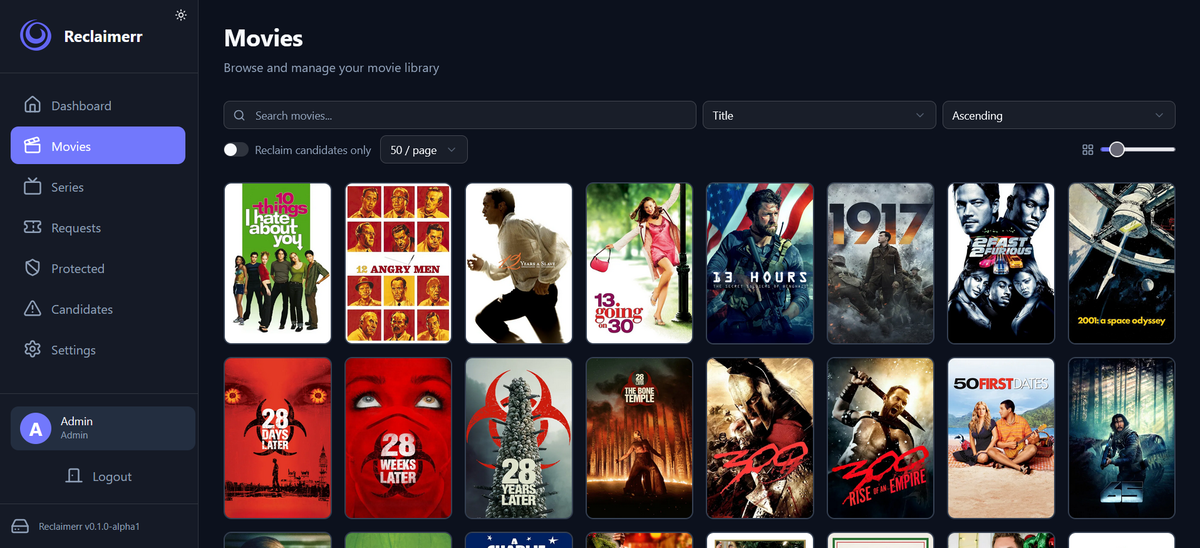
Reclaimerr: Automatically Reclaim Disk Space from Your Media Library (2026)
Your media server has a storage problem. Not because you do not have enough drives, but because half your library is content nobody has watched in two years. That 4K remux of a movie with a 4.2 rating that someone requested once and never touched is consuming 60 GB. Multiply that by a few hundred titles and you are looking at terabytes of dead weight.
Reclaimerr solves this. It is a self-hosted application that analyzes your media library, identifies content eligible for cleanup based on customizable rules, and manages the deletion process through your existing Radarr/Sonarr setup or directly through your media server.
Think of it as Seerr in reverse. Seerr adds content to your library. Reclaimerr removes what nobody watches.
Why Reclaimerr Exists
The developer built Reclaimerr when 100 TB of storage on their home server was nearly full and the cost of new drives kept rising. Rather than buying more hardware, they decided to clean up the unwatched and low-rated media that had accumulated over years of automated downloads.
The project was inspired by Maintainerr, but needed features Maintainerr did not offer at the time: simultaneous Jellyfin and Plex support (using both servers to gather watch data for the same physical library), and a protection system that lets users save content from deletion.
Core Features
Rule-Based Space Reclamation
Configure rules that define what qualifies for cleanup. Rules can combine multiple criteria:
- Watch status (unwatched for X days/months)
- Rating thresholds (below X on TMDB/IMDB)
- Age (added more than X months ago)
- File size (target the largest files first)
- Media type (movies vs TV shows)
Reclaimerr scans your library against these rules on a configurable schedule and identifies content eligible for reclamation.
Multi-Server Support (Jellyfin + Plex + Emby)
This is the standout feature. Reclaimerr connects to Jellyfin, Plex, and Emby simultaneously. You designate one server as the primary, and supplemental watch data is gathered from the others.
Why this matters: many admins run multiple media servers pointing at the same physical library. A movie might be unwatched on Jellyfin but watched on Plex by a different family member. Reclaimerr sees both and will not flag content as unwatched if anyone on any server has seen it.
All servers must manage the same physical media library for this to work correctly.
Protection System
Not everything that meets cleanup rules should be deleted. The protection system lets users save content:
- Admin protection - admins can protect any item from deletion
- User requests - users can request protection for content they want to keep
- Approval workflow - protection requests go to admins for approval or denial
- Time-based control - protection can be set for a specific duration (protect for 6 months, then re-evaluate)
This turns media cleanup from a unilateral admin decision into a collaborative process. Users feel heard, admins maintain control.
User Deletion Requests
The flip side of protection: users can also request that specific media be deleted. Useful for shared servers where users want to flag content they consider low quality or inappropriate.
Managed Deletions via Radarr/Sonarr
When Radarr or Sonarr are configured, Reclaimerr processes deletions through them rather than deleting files directly. This means:
- Radarr/Sonarr remove the item from their database
- Download client cleanup happens automatically
- The item can be unmonitored instead of deleted (configurable)
- Seerr requests for the item are also removed
If Radarr/Sonarr are not configured, Reclaimerr falls back to deleting through the primary media server.
Move Instead of Delete
If permanent deletion makes you nervous, enable the move option. Reclaimerr moves files to an archive directory instead of deleting them. You can review the archive later and permanently delete when you are confident nothing important was caught.
Notifications via Apprise
Reclaimerr uses Apprise for notifications, which supports over 133 services: Discord, Telegram, Slack, email, Ntfy, Gotify, Pushover, and many more. Get notified when:
- New items are flagged for reclamation
- Protection requests are submitted
- Deletions are processed
- Errors occur during cleanup
Watch Data Supplementation
- Jellyfin/Emby: automatically supplements watch data via the Playback Reporting plugin if installed
- Plex: supports Tautulli to supplement watch data with detailed history
This gives Reclaimerr the most complete picture of what has actually been watched across your entire user base.
How It Works
Reclaimerr scans your library (via Jellyfin/Plex/Emby API)
  > Applies your configured rules
  > Identifies eligible items
  > Checks protection list
  > Presents candidates in the UI
  > Admin approves deletions (or automatic in future)
  > Deletion processed via Radarr/Sonarr (or direct)
  > Notifications sent
  > Disk space reclaimed
Important: Reclaimerr is lightweight and avoids spinning up disks outside of actual deletions. All data is sourced from your media server APIs, not by scanning the filesystem directly.
Current Status: Beta with Safety Rails
Reclaimerr is in early beta. The developer has deliberately disabled fully automatic deletion until the system is thoroughly tested by the community:
- Automatic deletion tasks are not enabled in the UI yet
- Only admins or users with appropriate permissions can manage deletions
- Once automatic deletions are added, they will be opt-in
This cautious approach is the right call. A bug in an automatic deletion system could permanently destroy irreplaceable media. Manual approval during beta ensures nothing is lost unexpectedly.
Installation
Docker (Recommended)
Create a .env file:
DATA_DIR=./data
API_HOST=0.0.0.0
API_PORT=8000
CORS_ORIGINS=http://localhost:3000
# TZ=America/New_York
# PUID=1000
# PGID=1000
Create docker-compose.yml:
services:
  reclaimerr:
    image: ghcr.io/jessielw/reclaimerr:latest
    container_name: reclaimerr
    restart: unless-stopped
    env_file: ".env"
    volumes:
      - ./data:/app/data
      - /media:/media  # bind mount for media files (needed for direct deletion)
    ports:
      - "8000:8000"
Deploy:
docker compose up -d
Access at http://your-server:8000. Create your admin account on first visit.
Desktop Builds
Pre-built binaries are available for Windows (8+), macOS, and Linux from the GitHub Releases page. Run the executable and it creates a system tray icon. Double-click to open in your browser.
Volume Mounts
The media bind mount (/media:/media) is needed for Reclaimerr to clean up additional files on delete when deleting via the main media server directly. If you only delete through Radarr/Sonarr, this mount is less critical but still recommended.
Optional: mount an archive directory for the move-instead-of-delete feature.
Configuration
| Variable | Required | Description |
|---|---|---|
DATA_DIR | No | Directory for app data (default: ./data) |
API_HOST | No | Listen address (default: 0.0.0.0 for Docker, 127.0.0.1 for desktop) |
API_PORT | No | Port (default: 8000) |
PUID / PGID | No | LinuxServer-style user/group mapping for Unraid/NAS |
UMASK | No | File permission mask (common: 022, 002) |
TZ | No | Timezone for cron schedules (e.g., America/New_York) |
JWT_SECRET | No | Auto-generated on first launch (or set your own, min 32 chars) |
ENCRYPTION_KEY | No | Auto-generated on first launch (or set your own) |
ADMIN_PASSWORD | No | Set/reset admin password on launch (remove after use) |
COOKIE_SECURE | No | Set to true when serving over HTTPS |
LOG_LEVEL | No | DEBUG, INFO, WARNING, ERROR, CRITICAL |
LOG_RETENTION_DAYS | No | Keep N daily rotated log files (default: 30) |
Multi-User and Permissions
Reclaimerr supports multiple users with a permission system:
- Admin - full control: configure rules, approve/deny requests, manage deletions
- Users - can browse flagged content, request protection, request deletions
The first account created becomes admin. Additional users can be added through the admin interface.
Reclaimerr vs Maintainerr
Maintainerr is the closest alternative. Here is how they compare:
| Feature | Reclaimerr | Maintainerr |
|---|---|---|
| Jellyfin support | Yes (native) | Yes (v3.0+) |
| Plex support | Yes | Yes |
| Emby support | Yes | No |
| Multi-server simultaneous | Yes (all three at once) | Single server |
| Protection system | Yes (with user requests) | Collections-based |
| User deletion requests | Yes | No |
| Move instead of delete | Yes | No |
| Desktop builds | Yes (Windows/Mac/Linux) | Docker only |
| Seerr request removal | Yes | Yes |
| Tautulli integration | Yes | Yes |
| Notifications | Apprise (133+ services) | Limited |
| Automatic deletion | Coming (beta safety) | Yes |
| Maturity | Beta (2026) | Stable |
Reclaimerr wins on multi-server support, the protection/request system, and platform flexibility. Maintainerr wins on maturity and fully automatic operation.
Security
- Encrypted credentials - API keys and tokens are encrypted at rest using a generated encryption key
- JWT authentication - all endpoints require valid session tokens
- Auto-generated secrets - JWT secret and encryption key are generated on first launch if not provided
- HTTPS support - set
COOKIE_SECURE=truewhen behind a reverse proxy with SSL
Post-Action Webhooks
Reclaimerr supports generic post-action webhooks that fire after deletions. This integrates with tools like Autopulse for triggering library rescans or other automation after content is removed.
Use Cases
The overflowing server
You have 80 TB of media and drives are full. Set rules: delete movies unwatched for 12+ months with a rating below 6.0 and file size above 20 GB. Reclaimerr identifies candidates. You review and approve. Terabytes freed without buying new hardware.
The shared family server
Multiple family members use the server. Enable the protection system. When cleanup rules flag a movie, family members can request protection for content they plan to watch. Admins approve or deny. Nobody loses something they care about.
The multi-server admin
You run Plex for some users and Jellyfin for others, both pointing at the same library. Reclaimerr checks watch history from both servers before flagging anything. A movie watched on Plex is not flagged as unwatched just because the Jellyfin users have not seen it.
The cautious admin
Enable move-instead-of-delete. Reclaimerr moves flagged content to an archive folder. After 30 days with no complaints, permanently delete the archive. Zero risk of accidental loss.
Troubleshooting
| Problem | Fix |
|---|---|
| Cannot connect to Jellyfin | Add Docker bridge subnet (172.28.0.0/16) to Jellyfin LAN Networks |
| Permission denied on delete | Check PUID/PGID match your media file ownership |
| Admin password forgotten | Set ADMIN_PASSWORD in .env and restart |
| Port conflict | Change API_PORT in .env |
FAQ
Will Reclaimerr automatically delete my media? Not yet. During beta, all deletions require manual approval. Automatic deletion will be opt-in once the system is thoroughly tested.
Does it work with all three servers at once? Yes. Connect Jellyfin, Plex, and Emby simultaneously. Designate one as primary; the others supplement watch data.
Can users prevent their favorite content from being deleted? Yes. The protection system lets users request that specific items be protected from cleanup rules.
Does it delete files directly? If Radarr/Sonarr are configured, deletions go through them. Otherwise, it deletes via the primary media server. You can also enable move-instead-of-delete for safety.
Is it lightweight? Yes. Reclaimerr sources all data from media server APIs. It does not scan your filesystem directly, which means it does not spin up drives unnecessarily.
Does it support Unraid? Yes. Use PUID/PGID environment variables for proper file permissions on Unraid.
Is there a mobile UI? The web interface is responsive and works well on mobile browsers.
Links
- GitHub: github.com/jessielw/Reclaimerr
- Matrix community: #reclaimerr:matrix.org
- Docker image:
ghcr.io/jessielw/reclaimerr:latest
Reclaiming space from your library? Monitor what remains from your phone. Download JellyWatch on Google Play - session monitoring, storage alerts, and server health for Jellyfin.
Download EmbyWatch on Google Play - the same monitoring experience for Emby servers.



Comments
No comments yet. Be the first to share your thoughts.
Leave a comment