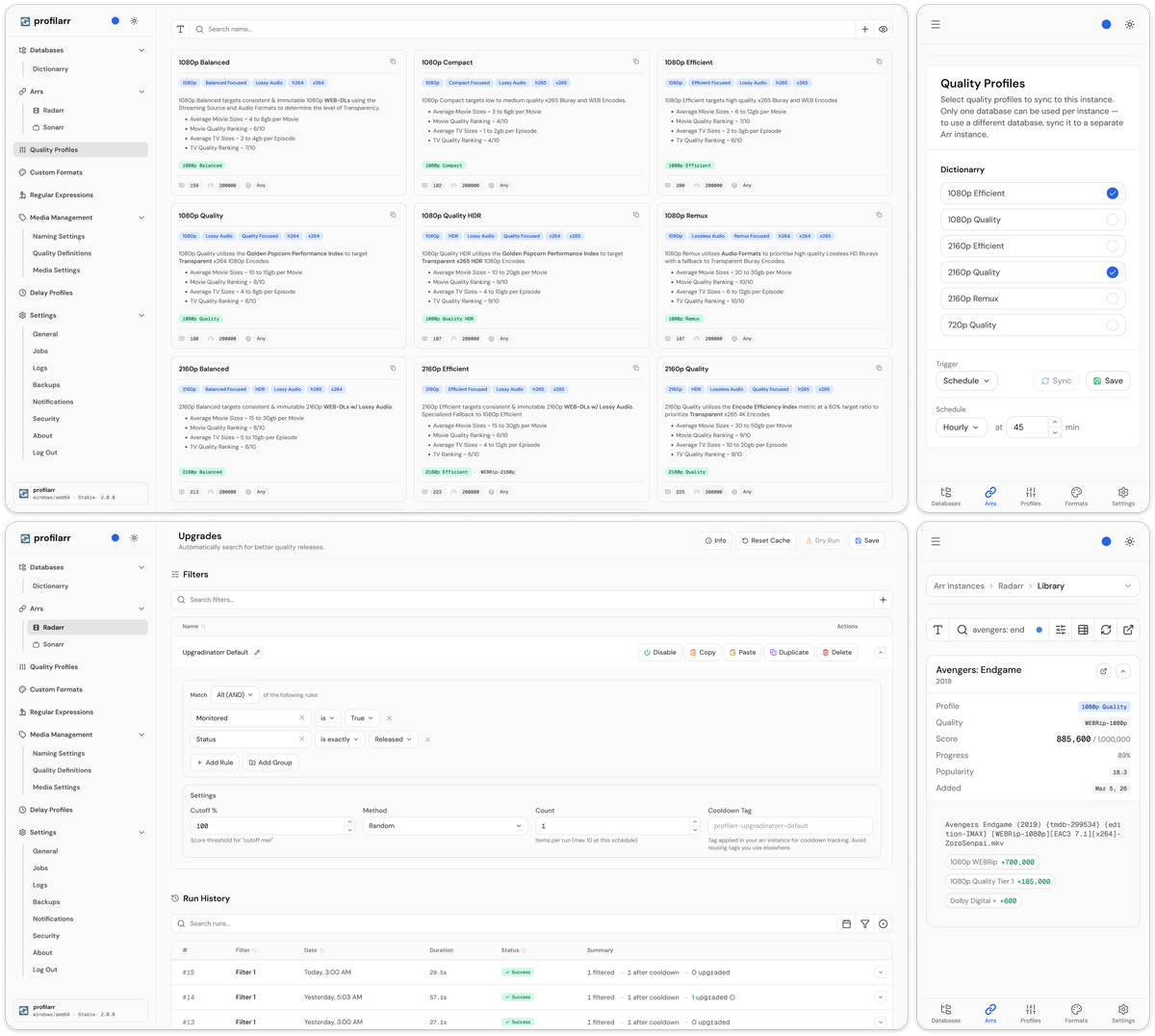
Profilarr: The Configuration Management Platform for Radarr and Sonarr (2026)
If you manage a media server with Radarr and Sonarr, you have spent hours configuring quality profiles. Copying custom formats from TRaSH Guides. Pasting JSON. Adjusting scores. Then doing it all again on your second Radarr instance for 4K content. And again when TRaSH updates their recommendations.
Profilarr eliminates this entire workflow. It is a centralized platform where you build, test, and deploy configurations across any number of Radarr and Sonarr instances. Link a curated database (TRaSH Guides, Dictionarry, Dumpstarr), customize what you need, test your regex patterns against real release names, simulate how profiles score releases, then push everything to your instances with a single sync.
No more manual JSON pasting. No more configuration drift between instances. No more guessing whether your custom format actually matches what you think it matches.
What Profilarr Does
Profilarr is organized around three core workflows: Build, Test, and Deploy.
Build
Create and manage your Radarr/Sonarr configurations from a single interface:
- Link databases - connect to curated community databases like Dictionarry, TRaSH Guides, or Dumpstarr. Import their custom formats and quality profiles directly.
- Build your own - create custom formats, quality profiles, and regex patterns from scratch using the visual editor.
- Quality profiles - group and order qualities, assign custom format scores per application (Radarr vs Sonarr can have different scores for the same format).
- Custom formats - match releases by resolution, source, release group, file size, language, and more.
- Regular expressions - reusable regex patterns shared across multiple custom formats.
- Media management - naming conventions, media settings, and quality definitions.
- Delay profiles - protocol preferences, delays, and score gates.
- Local tweaks - your customizations persist across upstream database updates with smart conflict handling.
The local tweaks feature is particularly important. When TRaSH Guides or Dictionarry update their recommendations, Profilarr merges the changes while preserving your personal modifications. No more "update wiped my custom scores" situations.
Test
This is where Profilarr separates itself from every other configuration tool:
- Regex testing - validate patterns with embedded Regex101-style test cases directly in the UI.
- Custom format testing - test releases against your custom format conditions with a full breakdown of how each condition passes or fails, with match visualization. Powered by a C# parser that matches Radarr and Sonarr own parsing logic.
- Quality profile simulation - simulate how a profile scores and ranks releases for a given movie or series. See exactly which release would be selected and why.
The C# parser is the key differentiator. Other tools let you write custom formats and hope they work. Profilarr lets you verify they work before deploying, using the same parsing engine that Radarr and Sonarr use internally.
Deploy
Push your configurations to your media stack:
- Sync - push configurations to any number of Arr instances simultaneously.
- Upgrades - automated searches with configurable filters, selectors, and cooldowns.
- Rename - bulk rename files and folders with dry-run previews before committing.
- Jobs - scheduled automation for sync, upgrades, renames, backups, and cleanup.
- Notifications - Discord, Telegram, Slack, ntfy, Pushover, Gotify, Apprise, and generic webhooks.
The Database Ecosystem
Profilarr is not just a standalone tool. It connects to a growing ecosystem of curated configuration databases:
Dictionarry
The primary database maintained by the Profilarr team. Curated custom formats and quality profiles designed to work together as a cohesive system.
TRaSH Guides
The community standard for Radarr/Sonarr configuration. Profilarr can link directly to TRaSH Guides and import their custom formats and quality profiles.
Dumpstarr
A community-maintained database of custom formats covering codecs, sources, HDR, audio, and release groups. Designed specifically for use with Profilarr.
Build Your Own (PCD Template)
Profilarr provides a template for creating and sharing your own configuration database. If you have a specialized setup (anime-focused, 4K-only, bandwidth-constrained), you can package your configurations as a linkable database that others can use.
Why This Matters for Jellyfin and Emby Users
Profilarr does not interact with Jellyfin or Emby directly. But it dramatically improves the quality of content that flows into your media server through Radarr and Sonarr.
Better custom formats mean:
- Fewer transcodes - files are grabbed in codecs your clients support
- Better HDR handling - proper HDR metadata is prioritized
- Consistent quality - no more random low-quality grabs mixed with remuxes
- Optimal file sizes - releases match your storage and bandwidth constraints
- Better audio - Atmos and DTS-X prioritized when available
The content that arrives in your Jellyfin or Emby library is only as good as your Radarr/Sonarr configuration. Profilarr makes that configuration reliable and testable.
Docker Setup
services:
  profilarr:
    image: ghcr.io/dictionarry-hub/profilarr:latest
    container_name: profilarr
    ports:
      - "6868:6868"
    volumes:
      - ./config:/config
    environment:
      - PUID=1000
      - PGID=1000
      - TZ=Etc/UTC
      - PARSER_HOST=parser
      - PARSER_PORT=5000
    depends_on:
      parser:
        condition: service_healthy

  # Optional - only needed for custom format and quality profile testing
  parser:
    image: ghcr.io/dictionarry-hub/profilarr-parser:latest
    container_name: profilarr-parser
    expose:
      - "5000"
The parser service is optional. It is only required for the custom format and quality profile testing features. Linking databases, syncing to instances, and all other features work without it. Remove the parser service if you do not need testing capabilities.
docker compose up -d
Access at http://your-server:6868.
Configuration
| Variable | Default | Description |
|---|---|---|
PUID | 1000 | User ID for file permissions |
PGID | 1000 | Group ID for file permissions |
UMASK | 022 | File creation mask |
TZ | Etc/UTC | Timezone for scheduling |
PORT | 6868 | Web UI port |
HOST | 0.0.0.0 | Bind address |
AUTH | on | Auth mode (on, oidc, off) |
ORIGIN | - | Public URL when behind a reverse proxy |
PARSER_HOST | localhost | Parser service host |
PARSER_PORT | 5000 | Parser service port |
How Profilarr Compares to Recyclarr
Recyclarr is the other major tool for syncing TRaSH Guides to Radarr/Sonarr. Here is how they differ:
| Feature | Profilarr | Recyclarr |
|---|---|---|
| Interface | Web UI (visual) | CLI (YAML config) |
| Custom format testing | Yes (C# parser) | No |
| Quality profile simulation | Yes | No |
| Multiple databases | Yes (Dictionarry, TRaSH, Dumpstarr, custom) | TRaSH Guides only |
| Local tweaks with conflict handling | Yes | Manual YAML editing |
| Automated upgrades | Yes (with filters and cooldowns) | No |
| Bulk rename with dry-run | Yes | No |
| Scheduled jobs | Yes (sync, upgrades, rename, backup) | Cron-based sync only |
| Notifications | Yes (Discord, Telegram, ntfy, etc.) | No |
| Regex testing | Yes (built-in) | No |
| Learning curve | Lower (visual) | Higher (YAML) |
| Docker footprint | 2 containers (app + optional parser) | 1 container |
Recyclarr is simpler and lighter if you just want to sync TRaSH Guides on a schedule. Profilarr is the choice when you want to build, test, and manage configurations visually with full control over multiple databases and instances.
The Testing Engine
The testing capabilities deserve special attention because they solve a real problem.
When you write a custom format in Radarr, you are essentially writing a set of regex conditions that match against release names. If your regex is wrong, you silently grab the wrong releases or miss the ones you want. You only discover the problem after a bad file lands in your library.
Profilarr testing workflow:
- Write your custom format conditions in the visual editor
- Enter sample release names (real ones from your indexers)
- Click Test
- See exactly which conditions matched, which failed, and why
- The parser uses the same C# logic as Radarr/Sonarr, so results are accurate
- Fix your regex, test again, deploy with confidence
The quality profile simulation goes further: give it a movie title and it shows you how your profile would rank all available releases, which one it would select, and the score breakdown. You can verify your entire scoring system before it touches a real download.
Multi-Instance Sync
Many admins run multiple Radarr/Sonarr instances:
- Radarr (1080p) + Radarr (4K)
- Sonarr (standard) + Sonarr (anime)
- Separate instances per user or per quality tier
Profilarr syncs to all of them from a single configuration. Define your profiles once, push to every instance. When you update a custom format score, it propagates everywhere on the next sync.
This eliminates configuration drift, the silent problem where your 4K Radarr instance gradually diverges from your 1080p instance because you forgot to apply a change to both.
Automated Upgrades
Beyond syncing configurations, Profilarr can trigger automated upgrade searches:
- Configure filters (only upgrade files below a certain score)
- Set selectors (which instances to target)
- Define cooldowns (do not re-search items that were already searched recently)
- Schedule via jobs (run upgrades nightly at 3 AM)
This means your library continuously improves over time. A movie grabbed as a WEB-DL gets automatically upgraded to a Blu-ray encode when one becomes available, without manual intervention.
Bulk Rename with Dry-Run
Renaming files in Radarr/Sonarr is nerve-wracking. One wrong naming format and thousands of files get renamed incorrectly.
Profilarr rename feature:
- Configure your naming format
- Run a dry-run preview
- See exactly what every file will be renamed to before committing
- Approve and execute
No surprises. No "I accidentally renamed 4,000 files and now Plex cannot find them" moments.
Scheduled Jobs
Profilarr supports scheduled automation for:
- Sync - push configuration changes on a schedule
- Upgrades - automated quality upgrades
- Renames - scheduled bulk rename operations
- Backups - configuration backup on schedule
- Cleanup - remove orphaned data
All jobs support cron-style scheduling and notification on completion or failure.
OIDC Authentication
Profilarr supports OIDC (OpenID Connect) authentication, meaning you can integrate it with Authelia, Authentik, or any other SSO provider. Set AUTH=oidc and configure your provider.
Getting Started Workflow
- Deploy Profilarr with Docker
- Link a database (Dictionarry or TRaSH Guides)
- Browse available custom formats and quality profiles
- Customize scores and preferences for your setup
- Test your custom formats against real release names
- Simulate quality profile scoring
- Connect your Radarr/Sonarr instances
- Sync
- Schedule recurring sync jobs
The entire process from zero to fully configured instances takes 15-30 minutes instead of the hours it takes manually.
FAQ
Does Profilarr replace Radarr/Sonarr? No. Profilarr manages the configuration of Radarr and Sonarr. It does not download, organize, or serve media. It makes your existing Arr instances better configured.
Does it work with Jellyfin/Emby/Plex directly? No. Profilarr configures Radarr and Sonarr, which feed content into your media server. The quality improvements benefit your media server indirectly through better source files.
Is the parser service required? Only for testing custom formats and simulating quality profiles. All other features (linking, syncing, jobs, notifications) work without it.
Can I use it with TRaSH Guides and Recyclarr? You can use Profilarr instead of Recyclarr. Both sync TRaSH Guides to your instances, but Profilarr adds testing, visual editing, and multi-database support. Running both simultaneously is not recommended as they would conflict.
Is it free? Yes. AGPL-3.0 licensed. Every feature is free for everyone.
How does it handle TRaSH Guide updates? When the linked database updates, Profilarr merges changes while preserving your local tweaks. Conflicts are surfaced for manual resolution rather than silently overwriting your customizations.
Can multiple users access it? Yes. Profilarr supports authentication (built-in or OIDC) with user management.
Links
- GitHub: github.com/Dictionarry-Hub/profilarr
- Documentation: dictionarry.dev
- Dumpstarr database: dumpstarr.dev
- Docker image:
ghcr.io/dictionarry-hub/profilarr:latest - Reddit: r/profilarr
Better Radarr/Sonarr configs mean better content in your library. Monitor what arrives. Download JellyWatch on Google Play - session monitoring, Direct Play verification, and server health for Jellyfin.
Download EmbyWatch on Google Play - the same monitoring experience for Emby servers.


Comments
No comments yet. Be the first to share your thoughts.
Leave a comment