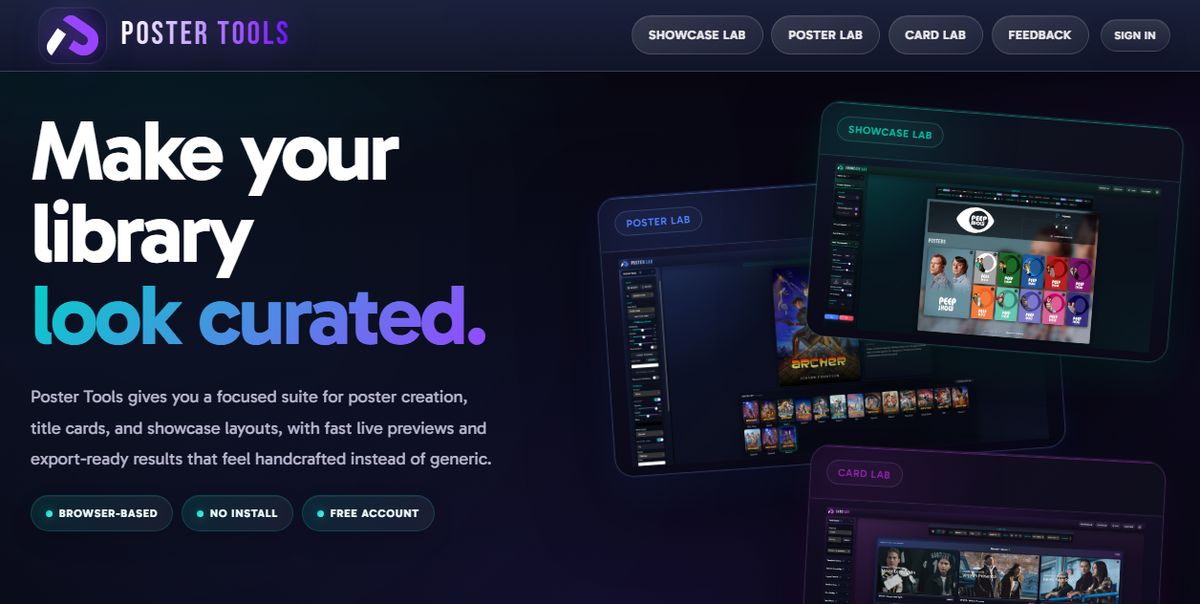
Poster Tools: The Browser-Based Poster and Title Card Designer for Plex, Emby, and Jellyfin (2026)
A well-curated media library is not just about the content. It is about how it looks. Consistent poster sets, matching season artwork, and custom title cards transform a folder of files into something that feels like a premium streaming platform.
The problem: creating that level of visual consistency used to require Photoshop, hours of manual work, and genuine design skills. Most self-hosters either settle for whatever TMDB provides or spend entire weekends in image editors.
Poster Tools changes that equation entirely. It is a free, browser-based design suite built specifically for the Plex, Emby, and Jellyfin community. No software to install. No design experience required. Open a browser tab, pull artwork from TMDB, adjust your layout, and push finished posters directly to your media server.
What Is Poster Tools?
Poster Tools is a web application at postertools.org that provides focused design tools for media server artwork. It runs entirely in the browser with nothing to install on your computer or server.
The suite currently includes three labs:
| Lab | Purpose |
|---|---|
| Poster Lab | Create season and show poster sets with logos, gradients, and badges |
| Card Lab | Design episode title cards with typography controls and custom separators |
| Showcase Lab | Build showcase layouts for displaying your library |
Each lab provides live previews as you design, export-ready output, and direct integration with your media server for one-click deployment.
Poster Lab: Season and Show Poster Sets
Poster Lab is the core tool. It solves the most common visual problem in media libraries: inconsistent poster artwork across seasons of the same show.
Season 1 has a dark, moody poster. Season 2 has a bright promotional image. Season 3 uses a completely different art style. The result looks messy on your home screen.
Poster Lab lets you build a unified set:
- Pull artwork from TMDB - search for your show and select base images
- Add a logo - drop in the show logo for consistent branding
- Adjust the gradient - control the color overlay and fade
- Customize text - season numbers, titles, custom labels
- Add badges - resolution indicators, audio format labels, or custom badges
- Apply finishing passes - fine-tune the final look
- Push to your server - send the entire set directly to Emby or Jellyfin in one click (Plex support coming soon)
The key workflow advantage: you design one poster, then the tool generates matching variants for every season automatically. Consistent artwork across your entire library without repeating the design process for each season.
TMDB Integration
Poster Lab connects to TMDB for source artwork. Search for any movie or show, browse available backdrops and posters, and use them as your base layer. The tool fetches high-resolution images suitable for display on 4K screens.
Direct Server Push
This is the feature that separates Poster Tools from generic image editors. Once your poster set is ready, push it directly to your media server without manually downloading files, navigating to each season, and uploading one by one.
Supported servers:
- Emby
- Jellyfin
- Plex (coming soon)
Configure your server connection once, and every future poster push is a single click.
Card Lab: Episode Title Cards
Title cards are the images displayed for individual episodes in your library. A good title card shows the episode title over a relevant still frame, making your episode list look like a professional streaming service.
Card Lab provides:
- Full typography controls - font selection, size, weight, spacing, positioning
- Custom separator images - decorative elements between text lines
- Per-episode customization - adjust individual cards while maintaining set consistency
- Background image selection - pull stills or use custom backgrounds
- Batch generation - create cards for an entire season at once
- Sonarr integration - pull episode data directly from Sonarr for Card Lab
- Export options - format, quality, and naming conventions
Typography Focus
Card Lab treats typography as a first-class feature. You control:
- Font family (upload custom fonts or use the built-in library)
- Font size and weight
- Letter spacing and line height
- Text color and shadow
- Position and alignment
- Separator style between title elements
This level of control was previously only available in Photoshop or specialized tools like TitleCardMaker (which requires Docker and technical setup). Card Lab puts it in a browser tab.
Showcase Lab
Showcase Lab creates display layouts for presenting your library. Think of it as a tool for building visual showcases of your collection, useful for sharing on Reddit, Discord, or social media.
How It Compares to Other Poster Tools
The media server community has several poster-related tools. Here is how Poster Tools fits in:
| Tool | Type | Setup | Design control | Server push | Cost |
|---|---|---|---|---|---|
| Poster Tools | Browser app | None (web) | High (visual editor) | Yes (Emby/Jellyfin, Plex soon) | Free + Premium |
| Posterizarr | Docker container | Docker setup | Automated (templates) | Yes | Free |
| TitleCardMaker | Docker container | Docker + config | Template-based | Yes | Free |
| Kometa | Docker container | Docker + YAML | Overlay-based | Yes (Plex/Jellyfin) | Free |
| Photoshop/GIMP | Desktop app | Install | Unlimited | Manual upload | Paid/Free |
| ThePosterDB | Website | None | Browse only (community) | Manual download | Free |
When to use Poster Tools
- You want visual, interactive design rather than template configuration
- You prefer browser-based tools with no Docker or installation
- You want direct server push without manual file management
- You need consistent season sets generated from a single design
- You value typography control for title cards
When to use alternatives
- Posterizarr/Kometa: you want fully automated poster generation with zero manual design
- TitleCardMaker: you need batch title card generation for hundreds of episodes via config files
- ThePosterDB: you want to browse and download community-made posters rather than design your own
Account and Pricing
Poster Tools uses a freemium model:
Free tier
- Full access to all three labs
- Design and export posters and title cards
- TMDB artwork integration
- Config sync across all labs
- Creation stats
- Export overrides (custom format, quality, and naming)
- Font library (up to 10 uploads)
Premium features
- Server integration - direct push to Emby and Jellyfin (and Sonarr for Card Lab)
- Unlimited fonts - upload as many custom fonts as you need
- Unlimited separator images - custom decorative elements for Card Lab
The free tier is genuinely usable for creating and exporting artwork with full design control. Premium adds server integration for direct push and removes upload limits for fonts and separators.
Getting Started
- Open postertools.org in your browser
- Create a free account
- Choose a lab (Poster Lab for show posters, Card Lab for title cards)
- Search for your show via TMDB
- Design your artwork with the visual editor
- Export or push directly to your server
No installation. No Docker. No command line. The entire workflow happens in your browser.
Server Integration Setup
To push posters directly to your media server (premium feature):
Emby
- Get your Emby API key (Dashboard > API Keys)
- Enter your Emby server URL and API key in Poster Tools settings
- Browse your library from within Poster Tools
- Push finished artwork with one click
Jellyfin
- Get your Jellyfin API key (Dashboard > API Keys)
- Enter your Jellyfin server URL and API key
- Push artwork directly to items in your library
Plex (Coming Soon)
Plex integration is currently in development. The push-to-server feature for Plex is not yet available but is planned for a future update.
Sonarr (Card Lab)
Card Lab can pull episode data directly from Sonarr, making it easy to generate title cards with accurate episode titles and numbering without manual entry.
Use Cases
Consistent season poster sets
The most common use case. You have a show with 5 seasons and each season poster looks completely different. Open Poster Lab, design one base poster with the show logo and your preferred gradient style, and generate matching posters for all seasons in minutes.
Custom title cards for a favorite show
You want your episode list to look like Netflix or Disney+. Open Card Lab, select your font and layout style, pull episode stills, and generate title cards for an entire season. Upload them to your server and your episode grid transforms.
Library showcase for sharing
You want to show off your curated library on Reddit or Discord. Open Showcase Lab, arrange your best posters into a display layout, and export a shareable image.
Matching artwork for collections
You have a Marvel collection, a Star Wars collection, a Nolan filmography. Design matching collection posters with consistent branding using Poster Lab.
Why Browser-Based Matters
The self-hosting community loves Docker containers. But for a design tool, browser-based has real advantages:
- No server resources consumed - your Jellyfin/Emby/Plex server is not running another container
- Works from any device - design on your laptop, desktop, or tablet
- Always up to date - no pulling new images or rebuilding containers
- No configuration files - visual interface instead of YAML
- Instant access - open a tab and start designing
The trade-off is that Poster Tools requires an internet connection and depends on the postertools.org service being available. For fully offline, self-hosted alternatives, Posterizarr and TitleCardMaker are the options.
Tips for Great Media Server Artwork
Poster consistency
- Pick one style (dark gradient, minimal text, logo-focused) and apply it across your entire library
- Use the same font family for all text overlays
- Keep badge placement consistent (always top-right, always bottom-left, etc.)
Title card readability
- Use high-contrast text (white on dark backgrounds, with shadow)
- Keep episode titles short on the card (abbreviate if needed)
- Choose a still frame that does not compete with the text
Resolution
- Export at 1000x1500 minimum for posters (2000x3000 for 4K displays)
- Title cards should be 1920x1080 or higher
- Use TMDB backdrop images as source material (they are typically 3840x2160)
FAQ
Is Poster Tools free? Yes. The core design tools, config sync, creation stats, export overrides, and font library (up to 10 uploads) are all free. Premium adds server integration, unlimited fonts, and unlimited separator images.
Does it work with Jellyfin? Yes. Poster Tools supports Emby and Jellyfin for direct artwork push. Plex support is coming soon.
Do I need to install anything? No. Poster Tools runs entirely in your browser at postertools.org.
Can I use my own fonts? Yes. Free accounts can upload up to 10 custom fonts. Premium accounts have unlimited font uploads.
Is there a mobile app? No dedicated app, but the web interface works on tablets. Phone screens are too small for detailed poster design.
Does it replace Posterizarr or TitleCardMaker? Not exactly. Poster Tools is a manual design tool with visual controls. Posterizarr and TitleCardMaker are automated tools that generate artwork from templates and config files. They solve different problems. Use Poster Tools when you want creative control. Use automated tools when you want hands-off generation for large libraries.
Is my server data safe? Server credentials are stored in your Poster Tools account for the push feature. The service proxies requests to your server. If this concerns you, use the export feature instead and upload artwork manually.
Can multiple users share an account? Each account is individual. There is no team or shared workspace feature currently.
Does Card Lab work with Sonarr? Yes. Card Lab can pull episode data directly from Sonarr for accurate title card generation.
Links
- Website: postertools.org
The Bigger Picture: Library Aesthetics in 2026
The self-hosted media community has matured beyond "does it play?" to "does it look good?" Tools like Poster Tools, Posterizarr, Kometa overlays, and community poster databases (ThePosterDB, MediUX) reflect a community that cares about presentation as much as functionality.
A well-designed library is not vanity. It makes content discoverable. It makes the experience feel premium for your users. And it makes you proud of what you have built.
Poster Tools lowers the barrier to that level of polish from "knows Photoshop" to "can use a web browser." That is a meaningful contribution to the community.
Your library looks curated. Now monitor who is enjoying it. Download EmbyWatch on Google Play - real-time session monitoring for your Emby server.
Download JellyWatch on Google Play - the same monitoring experience for Jellyfin.


Comments
No comments yet. Be the first to share your thoughts.
Leave a comment