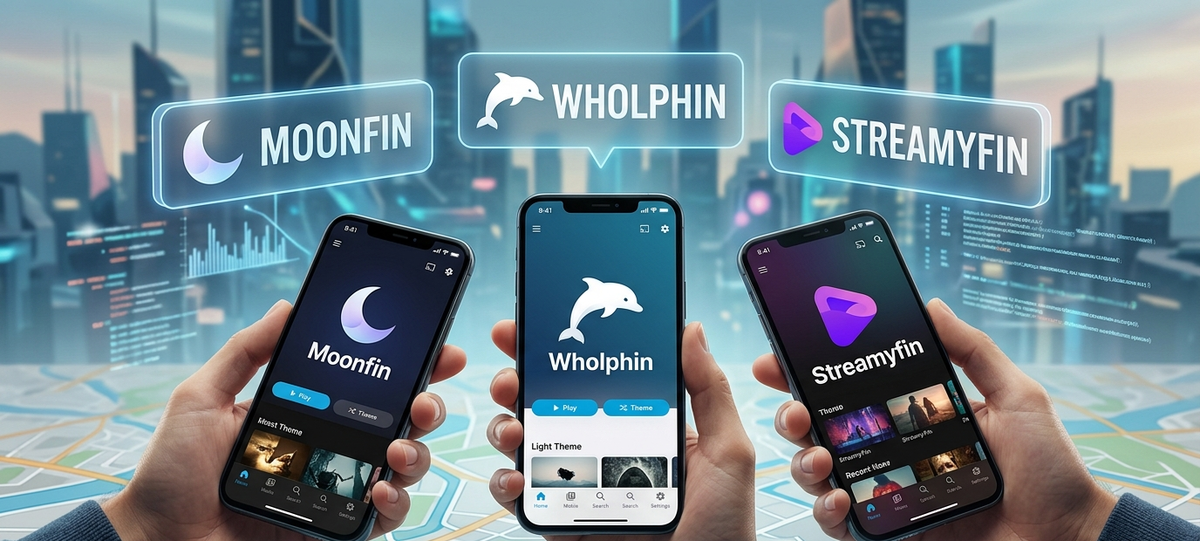
Moonfin vs Wholphin vs Streamyfin: Best Jellyfin Mobile & TV Client (2026)
The official Jellyfin apps work, but the community has built alternatives that go further in specific areas. If you spend time on Jellyfin communities, three names keep coming up: Moonfin, Wholphin, and Streamyfin.
Each targets a different use case. This guide compares them honestly so you can pick the right one (or use multiple).
Quick Comparison Table
| Feature | Moonfin | Wholphin | Streamyfin |
|---|---|---|---|
| Platforms | Android, iOS | Android TV, Fire TV, LG webOS | iOS, Android |
| Primary focus | Mobile playback | TV/big screen | Mobile + downloads |
| Video player | MPV-based | ExoPlayer | MPV-based |
| Offline downloads | Yes | No | Yes |
| 4K HDR playback | Yes | Yes | Yes |
| Dolby Vision | P8 (device dependent) | P8 (device dependent) | P8 (device dependent) |
| Open source | No (freemium) | Yes | Yes |
| Price | Free with premium tier | Free | Free |
| SyncPlay support | Yes | No | No |
| Intro skip button | Yes | Yes | No |
| Multiple servers | Yes | Yes | Yes |
| Active development | Very active | Active | Active |
| UI framework | Custom native | Leanback (Android TV) | React Native |
Moonfin - The Polished All-Rounder
Moonfin is a premium-feeling client available on both Android and iOS. It uses an MPV-based player which handles nearly any codec without transcoding.
Strengths
- Beautiful, modern interface with smooth animations
- MPV player handles HEVC, AV1, TrueHD, DTS-HD without server transcoding
- Offline downloads with queue management
- SyncPlay support for group watching
- Background audio playback for music
- Custom home screen layouts
- Picture-in-Picture mode
Weaknesses
- Not open source
- Some features require a paid tier
- No dedicated TV/leanback interface
- Newer project with occasional bugs
Best For
Power users on mobile who want the best playback compatibility and a polished experience. If you watch HDR/DV content on your phone and hate server transcoding, Moonfin is the answer.
Wholphin - The TV Specialist
Wholphin is built specifically for the big screen. It provides a proper leanback interface designed for remote control navigation on Android TV, Fire TV, and LG webOS.
Strengths
- True leanback/D-pad navigation (no touchscreen needed)
- Optimized for Android TV, Fire TV Stick, Nvidia Shield, LG webOS
- ExoPlayer with hardware decoding
- Intro skip button integration
- Next episode auto-play
- Low memory footprint (important for budget TV sticks)
- Open source and community-driven
Weaknesses
- No mobile/phone interface
- No offline downloads (TV-focused)
- ExoPlayer sometimes needs server transcoding where MPV would Direct Play
- LG webOS version requires sideloading
Best For
Anyone watching Jellyfin primarily on a TV. If the official Android TV app feels sluggish on your Fire TV Stick or you want a better remote-control experience on your Shield, Wholphin is the upgrade.
Streamyfin - The iOS Champion
Streamyfin started as an iOS-first Jellyfin client and expanded to Android. Its focus is on clean design and reliable offline downloads.
Strengths
- Clean iOS-native design language
- Robust offline download manager with transcoding options
- Background audio for music playback
- MPV player for broad codec support
- Simple, focused interface without bloat
- Open source
- CarPlay support
Weaknesses
- No dedicated TV interface
- No SyncPlay
- No intro skip integration (yet)
- Smaller feature set overall compared to Moonfin
- Android version is newer and less polished than iOS
Best For
iPhone and iPad users who want a native-feeling Jellyfin app with reliable offline downloads. If you commute and need episodes available without internet, Streamyfin delivers.
Head-to-Head: Playback Compatibility
The player engine determines what your client can play without forcing server transcoding.
| Codec/Format | Moonfin (MPV) | Wholphin (ExoPlayer) | Streamyfin (MPV) |
|---|---|---|---|
| H.264 | Direct Play | Direct Play | Direct Play |
| H.265/HEVC | Direct Play | Direct Play (most devices) | Direct Play |
| AV1 | Direct Play | Device dependent | Direct Play |
| TrueHD/Atmos | Direct Play | Transcode required | Direct Play |
| DTS-HD MA | Direct Play | Transcode required | Direct Play |
| ASS subtitles | Direct Play | Burn-in required | Direct Play |
| PGS subtitles | Direct Play | Burn-in required | Direct Play |
MPV-based clients (Moonfin, Streamyfin) handle more formats natively, reducing server load. ExoPlayer (Wholphin) relies on Android hardware decoders, which means some audio codecs and subtitle formats trigger transcoding.
Which Client Should You Use?
| Your Situation | Recommended Client |
|---|---|
| Android phone, want best quality | Moonfin |
| iPhone/iPad primary | Streamyfin |
| Android TV / Nvidia Shield | Wholphin |
| Fire TV Stick (budget) | Wholphin |
| LG webOS TV | Wholphin (or Breezyfin) |
| Offline downloads on Android | Moonfin |
| Offline downloads on iOS | Streamyfin |
| Group watch / SyncPlay | Moonfin |
| Open source priority | Wholphin or Streamyfin |
| Desktop/laptop | Official web client or Moonfin |
Can You Use Multiple Clients?
Absolutely. Jellyfin syncs watch progress server-side, so you can:
- Watch on Wholphin at home on your TV
- Continue on Moonfin on your phone during commute
- Download episodes with Streamyfin for your flight
All three will show your correct watch position.
What About the Official Jellyfin Apps?
The official apps are solid for most users. Consider third-party alternatives if:
- The official app triggers too much transcoding on your server
- You want offline downloads (official Android app lacks this)
- You need a better TV remote control experience
- You want advanced features like SyncPlay or background audio
The official apps remain the safest bet for simplicity and guaranteed compatibility with new Jellyfin server features.
FAQ
Do these clients cost money? Wholphin and Streamyfin are free and open source. Moonfin has a free tier with a premium option for advanced features.
Will my server admin see which client I use? Yes. The client name appears in active sessions. This does not affect functionality.
Do these work with Jellyfin 10.9 and 10.10? Yes. All three support modern Jellyfin server versions. Check GitHub releases for minimum server version requirements.
Can I use these with JellyWatch monitoring? Yes. All sessions appear in JellyWatch regardless of the player client used.
Which has the best subtitle support? Moonfin and Streamyfin (MPV-based) handle ASS/SSA and PGS subtitles without burn-in. Wholphin requires the server to burn these in.
Track your watch history across all these clients in one place. Download JellyWatch on Google Play - unified stats, session monitoring, and library management regardless of which player you use.



Comments
No comments yet. Be the first to share your thoughts.
Leave a comment