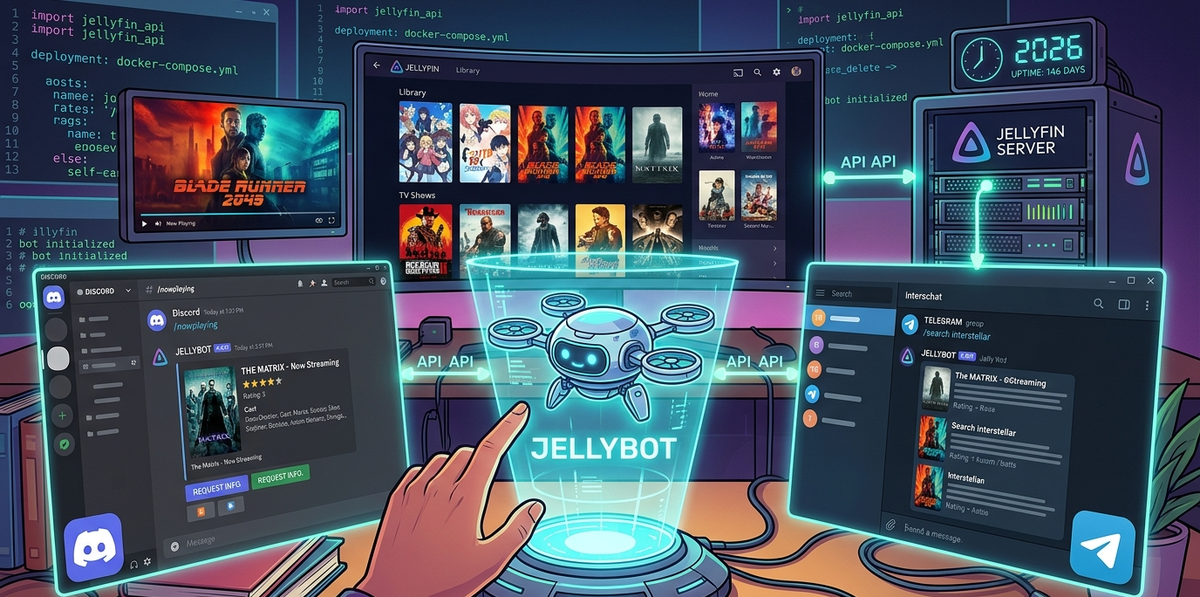
Build a Jellyfin Discord and Telegram Bot in 2026: Now Playing, Commands, and Rich Notifications
Jellyfin webhooks send one-way notifications. A bot goes further - it is interactive. Your Discord server members or Telegram group can type a command and instantly see what is playing, search your library, or request new content without ever opening a browser.
This guide covers the best community bots for Jellyfin, how to deploy them, and how to build custom integrations using the Jellyfin API.
Why a Bot Instead of Webhooks?
| Feature | Webhooks | Bot |
|---|---|---|
| New media notification | Yes | Yes |
| Now playing status | No | Yes |
| Library search | No | Yes |
| Media requests | No | Yes (with Seerr) |
| User commands | No | Yes |
| Rich embeds with artwork | Basic | Full |
| Interactive buttons | No | Yes |
Webhooks are fire-and-forget. Bots are conversational.
Option 1: Jellybot (Discord - Most Popular)
Jellybot is a community-built Discord bot that connects directly to your Jellyfin server API.
Features
/nowplaying- shows all active sessions with title, user, progress, and poster/search <query>- searches your Jellyfin library and returns results with artwork/recent- lists recently added movies and episodes/stats- server statistics (total items, users, active streams)- Automatic notifications for new media added
- Rich Discord embeds with poster images and metadata
Deployment with Docker
services:
  jellybot:
    image: ghcr.io/jellybot-team/jellybot:latest
    environment:
      - DISCORD_TOKEN=your_discord_bot_token
      - JELLYFIN_URL=http://jellyfin:8096
      - JELLYFIN_API_KEY=your_jellyfin_api_key
      - NOTIFICATION_CHANNEL_ID=123456789012345678
    restart: unless-stopped
Setup steps
- Create a Discord bot at discord.com/developers/applications
- Create a New Application → Bot → copy the token
- Invite the bot to your server with the OAuth2 URL generator (scopes: bot, applications.commands)
- Deploy the Docker container with your tokens
- The bot registers slash commands automatically
Example: /nowplaying output
🎬 Now Playing on MyServer

1. alice is watching "Dune: Part Two" (2024)
   ▶️ Playing · 1h 23m / 2h 46m · Direct Play
   📱 iPhone · Swiftfin

2. bob is watching "Breaking Bad" S05E14
   ⏸️ Paused · 32m / 47m · Transcode (H.265 → H.264)
   📺 Fire TV Stick · Jellyfin Android TV
Option 2: Jellyfin Telegram Bot
For Telegram users, several community bots provide similar functionality.
Deployment
services:
  jellyfin-telegram-bot:
    image: ghcr.io/jellyfin-telegram/bot:latest
    environment:
      - TELEGRAM_BOT_TOKEN=your_telegram_bot_token
      - JELLYFIN_URL=http://jellyfin:8096
      - JELLYFIN_API_KEY=your_jellyfin_api_key
      - ALLOWED_CHAT_IDS=123456789,987654321
    restart: unless-stopped
Setup steps
- Create a bot via @BotFather on Telegram
- Copy the bot token
- Get your chat ID (send a message to @userinfobot)
- Deploy the container
- Send
/startto your bot
Available commands
/nowplaying- active sessions/search <title>- search library/recent- recently added content/stats- server overview/request <title>- submit a media request (if Seerr is connected)
Security: ALLOWED_CHAT_IDS
Always restrict the bot to specific chat IDs. Without this, anyone who discovers your bot can query your server.
Option 3: Build Your Own Bot with the Jellyfin API
The Jellyfin REST API is well-documented and easy to use. Building a custom bot gives you full control.
Key API endpoints for bots
| Endpoint | What it returns |
|---|---|
GET /Sessions | All active sessions (users, media, progress, device) |
GET /Items?searchTerm=query | Library search results |
GET /Items/Latest | Recently added items |
GET /System/Info | Server version, OS, uptime |
GET /Users | All user accounts |
GET /Items/{id}/Images/Primary | Poster image for embeds |
Python example: Discord bot with now playing
import discord
from discord import app_commands
import aiohttp

JELLYFIN_URL = "http://jellyfin:8096"
JELLYFIN_API_KEY = "your_api_key"

intents = discord.Intents.default()
client = discord.Client(intents=intents)
tree = app_commands.CommandTree(client)

@tree.command(name="nowplaying", description="Show active Jellyfin sessions")
async def nowplaying(interaction: discord.Interaction):
    headers = {"X-Emby-Token": JELLYFIN_API_KEY}
    async with aiohttp.ClientSession() as session:
        async with session.get(
            f"{JELLYFIN_URL}/Sessions",
            headers=headers
        ) as resp:
            sessions = await resp.json()

    active = [s for s in sessions if s.get("NowPlayingItem")]

    if not active:
        await interaction.response.send_message("No active sessions.")
        return

    embed = discord.Embed(
        title="Now Playing",
        color=0x00A4DC
    )
    for s in active:
        item = s["NowPlayingItem"]
        user = s.get("UserName", "Unknown")
        title = item.get("Name", "Unknown")
        state = "▶️" if not s.get("PlayState", {}).get("IsPaused") else "⏸️"
        embed.add_field(
            name=f"{state} {user}",
            value=f"**{title}**",
            inline=False
        )

    await interaction.response.send_message(embed=embed)

@client.event
async def on_ready():
    await tree.sync()
    print(f"Bot ready: {client.user}")

client.run("your_discord_bot_token")
Dockerfile for the custom bot
FROM python:3.12-slim
WORKDIR /app
COPY requirements.txt .
RUN pip install --no-cache-dir -r requirements.txt
COPY bot.py .
CMD ["python", "bot.py"]
requirements.txt:
discord.py>=2.3
aiohttp>=3.9
Connecting Seerr for Media Requests via Bot
The most powerful bot feature: let users request movies and TV shows directly from Discord or Telegram.
How it works
- User types
/request Interstellarin Discord - Bot searches TMDB via the Seerr API
- Bot shows results with poster and year
- User confirms the request
- Seerr sends it to Radarr/Sonarr
- Content downloads and appears in Jellyfin automatically
Seerr API integration
SEERR_URL = "http://seerr:5055"
SEERR_API_KEY = "your_seerr_api_key"

async def search_seerr(query):
    headers = {"X-Api-Key": SEERR_API_KEY}
    async with aiohttp.ClientSession() as session:
        async with session.get(
            f"{SEERR_URL}/api/v1/search?query={query}",
            headers=headers
        ) as resp:
            return await resp.json()
Discord Rich Presence: Show What You Are Watching
Want your Discord profile to display "Watching Dune: Part Two on Jellyfin"? Two community tools handle this:
jellyfin-rpc (by Radiicall)
A lightweight daemon that reads your Jellyfin session and updates your Discord Rich Presence status.
# Install via cargo
cargo install jellyfin-rpc

# Or download the binary from GitHub releases
Configure ~/.config/jellyfin-rpc/main.json:
{
  "jellyfin": {
    "url": "http://jellyfin:8096",
    "api_key": "your_api_key",
    "username": "your_username"
  },
  "discord": {
    "application_id": "your_discord_app_id"
  }
}
Your Discord status shows: Watching "Dune: Part Two" with a Jellyfin icon and elapsed time.
jellyfin-rpc (by kennethsible)
An alternative implementation with similar features. Choose whichever has more recent commits.
Notification Embeds: Making Them Beautiful
The default Jellyfin webhook sends plain text. With a bot, you control the embed format:
Rich embed example (new movie added)
🎬 New Movie Added

Dune: Part Two (2024)
⭐ 8.5/10 (TMDB) · 2h 46m · PG-13
🎭 Denis Villeneuve
🏷️ Sci-Fi, Adventure, Drama

[poster image embedded]

Available now on MyServer
How to include poster images
The Jellyfin API serves poster images at:
GET /Items/{itemId}/Images/Primary?maxWidth=300
Use this URL as the embed thumbnail in your Discord or Telegram message.
Bot Security Best Practices
- Never expose your Jellyfin API key in public repositories
- Restrict bot commands to specific Discord channels or Telegram chat IDs
- Use read-only API keys when possible (Jellyfin does not support scoped keys natively, but you can create a non-admin user for the bot)
- Rate limit commands to prevent abuse
- Log all bot interactions for audit purposes
FAQ
Can the bot control playback (pause, stop, skip)? Yes, the Jellyfin API supports playback control via POST /Sessions/{id}/Playing/Stop. However, this is risky - a bot command could interrupt someone mid-movie. Use with caution.
Does the bot work if Jellyfin is behind a reverse proxy? Yes. The bot connects to the Jellyfin API URL you configure. It works with local IPs, reverse proxies, or Cloudflare Tunnels.
Can I run the bot on a different machine than Jellyfin? Yes. The bot only needs HTTP access to the Jellyfin API. It can run anywhere - a VPS, a Raspberry Pi, or the same Docker host.
Is there an official Jellyfin Discord bot? No. All Discord bots for Jellyfin are community-built. The Jellyfin project does not maintain an official bot.
Can the bot show transcoding information? Yes. The /Sessions API endpoint includes TranscodingInfo with codec, bitrate, and transcode reason - perfect for admin debugging from Discord.
Does this replace JellyWatch? No. A Discord bot is great for community interaction and quick checks. JellyWatch provides deep admin monitoring with push notifications, historical stats, and a native Android interface. They complement each other.
Bots handle the community. JellyWatch handles the server. Download JellyWatch on Google Play - real-time session monitoring, transcoding diagnostics, and push alerts that no Discord bot can match.
On Emby? Download EmbyWatch on Google Play - the same admin-grade monitoring for Emby servers.



Comments 2
Set up Jellybot for our friend group Discord server. The /nowplaying command with poster embeds is a hit. Everyone loves seeing what others are watching in real time.
The Telegram bot with ALLOWED_CHAT_IDS is essential. Without it, anyone who finds your bot can query your entire library. Security first.
Leave a comment