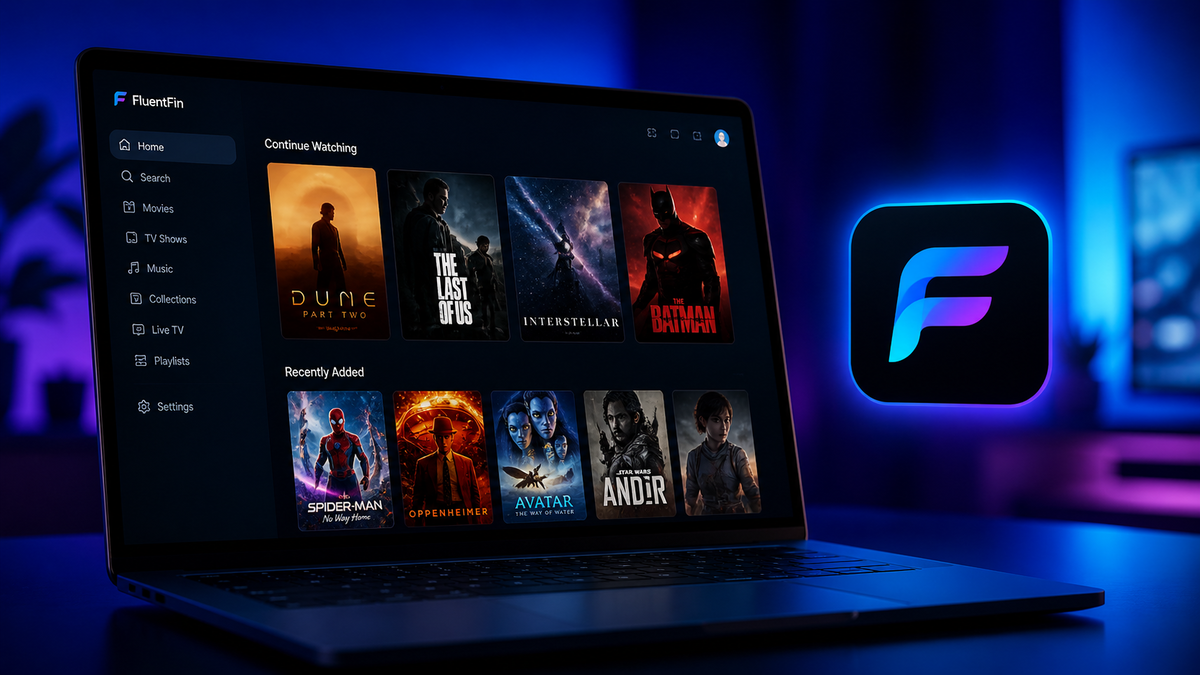
FluentFin Review 2026: The Best-Looking Jellyfin Client for Windows 11
If you use Windows 11 and Jellyfin, you have probably been using Jellyfin Media Player (JMP) - a Qt-based wrapper around the web UI with MPV as the playback engine. It works well, but it looks like a 2018 app on a 2026 operating system.
FluentFin changes that. It is a native Windows 11 Jellyfin client built with WinUI 3 - Microsoft's modern UI framework. It follows Fluent Design guidelines with Mica materials, rounded corners, smooth animations, and proper dark mode. It looks and feels like it belongs on Windows 11.
What Is FluentFin?
FluentFin is a free, open-source Jellyfin client built specifically for Windows. It is not a web view, not Electron, not a wrapper - it is a genuine native Windows application using WinUI 3 and the Windows App SDK.
- Source: github.com/insomniachi/FluentFin
- License: MIT
- Status: Beta (active development, frequent updates)
- Platform: Windows 10/11 only
Installation
Method 1: GitHub Releases
- Go to the FluentFin Releases page
- Download the latest
.msixpackage - Double-click to install (Windows handles MSIX natively)
- FluentFin appears in your Start menu
Method 2: WinGet (if available)
winget install FluentFin
Check the GitHub README for the latest winget package name.
First Impressions: The UI
The moment you open FluentFin, the difference from JMP is striking:
- Mica material - the translucent background effect that adapts to your wallpaper
- Rounded corners on every element - cards, buttons, dialogs
- Smooth animations - page transitions, hover effects, loading states
- System dark/light mode - follows your Windows theme automatically
- Proper window management - snap layouts, title bar integration, taskbar preview
The library grid displays your movies and shows with clean poster cards. Navigation uses a sidebar with icons for Home, Libraries, Search, and Settings. Everything feels responsive and native.
Codec Support
FluentFin uses Windows' built-in media decoders (Media Foundation) for playback. This means codec support depends on what Windows has installed:
| Codec | Support | Notes |
|---|---|---|
| H.264 (AVC) | Yes | Built into Windows |
| H.265 (HEVC) | Yes* | Requires HEVC Video Extensions from Microsoft Store (~$0.99 or free via device manufacturer) |
| AV1 | Yes | Built into Windows 10 1903+ |
| VP9 | Yes | Built into Windows |
| AAC | Yes | Built into Windows |
| AC3/EAC3 | Yes | Built into Windows |
| TrueHD | Partial | Depends on audio driver |
| DTS | Requires DTS codec | Available from Microsoft Store |
Important: If you have not installed the HEVC Video Extensions, H.265 content will trigger a server-side transcode. Install it from the Microsoft Store for Direct Play.
Compared to JMP
JMP uses MPV as its playback engine, which includes its own decoders for virtually every codec. JMP handles H.265, TrueHD, DTS, and exotic formats without any additional Windows codecs.
FluentFin relies on Windows codecs. JMP brings its own. This is the main technical trade-off.
HDR Support
FluentFin supports HDR playback on Windows 11 with HDR-capable displays:
- HDR10 passthrough works when Windows HDR mode is enabled
- The app respects the system HDR toggle
- Dolby Vision is not supported (falls back to HDR10)
HDR support is improving with each release but is not yet as mature as JMP, which has had years of MPV-based HDR refinement.
Features
What FluentFin does well
- Beautiful library browsing - the primary use case, and it excels here
- Fast startup - lighter than JMP, launches in under 2 seconds
- Search - instant search with results as you type
- Continue Watching - prominent on the home screen
- Next Up - TV show episode tracking
- User switching - multiple Jellyfin users supported
- Keyboard shortcuts - Space (play/pause), F (fullscreen), arrow keys (seek)
What is still in development
- Offline downloads - not yet available
- SyncPlay - group watch support is planned
- Live TV - basic support, still maturing
- Music playback - functional but not the focus
- Chromecast - not supported
FluentFin vs Jellyfin Media Player: When to Use Each
| Priority | Choose FluentFin | Choose JMP |
|---|---|---|
| Modern Windows 11 UI | ✓ | |
| Maximum codec support | ✓ | |
| HDR reliability | ✓ | |
| Fast, lightweight | ✓ | |
| Subtitle rendering (ASS) | ✓ | |
| TrueHD/DTS without extra codecs | ✓ | |
| Native Windows feel | ✓ | |
| Stability (production use) | ✓ |
The honest recommendation
If your library is mostly H.264 and H.265 (with HEVC Extensions installed) and you value a modern, beautiful interface: use FluentFin.
If you have exotic codecs, need reliable HDR, or want guaranteed Direct Play on everything: stick with JMP until FluentFin matures further.
Many users run both - FluentFin for casual browsing and JMP for problematic files.
Performance
FluentFin is noticeably lighter than JMP:
| Metric | FluentFin | JMP |
|---|---|---|
| Startup time | ~1.5 seconds | ~3-4 seconds |
| RAM at idle | ~80 MB | ~200 MB |
| RAM during playback | ~150-300 MB | ~300-500 MB |
The WinUI 3 framework is efficient. The app feels snappy even on modest hardware.
Known Limitations (Beta)
As of May 2026, FluentFin is still in beta. Known issues:
- Some subtitle formats render incorrectly (ASS styling not fully supported)
- Occasional playback stalls on very high bitrate files (80+ Mbps remuxes)
- No picture-in-picture mode
- No system media transport controls integration (yet)
- Updates require manual download from GitHub (no auto-update)
The developer is active and responsive on GitHub. Issues are typically addressed within days.
FAQ
Is FluentFin free? Yes. Free and open source under the MIT license.
Does it work on Windows 10? Yes, but the Mica material effects require Windows 11. On Windows 10 it falls back to a solid background.
Can I use FluentFin and JMP on the same machine? Yes. They are independent applications that both connect to your Jellyfin server.
Does FluentFin support multiple servers? Yes. You can add multiple Jellyfin servers and switch between them.
Is there a macOS or Linux version? No. FluentFin is Windows-only (WinUI 3 is a Windows framework). For macOS use Infuse or JMP. For Linux use Delfin or JMP.
Conclusion
FluentFin is the Jellyfin client Windows 11 deserves. It is beautiful, fast, and actively developed. The codec gap compared to JMP is real but narrowing. For daily library browsing and H.264/H.265 playback, it is already the better experience on Windows.
Keep JMP installed for edge cases. Use FluentFin for everything else.
Watching on FluentFin? Monitor your server from your phone. Download JellyWatch on Google Play - see every active session including desktop clients, with codec details and transcode status.


Comments
No comments yet. Be the first to share your thoughts.
Leave a comment