Findroid vs Jellyfin Official Android App vs JellyWatch for Android TV (2026)
Three free Android apps, all connecting to the same Jellyfin server. But the experience varies significantly depending on the screen you are watching on.
Quick Verdict
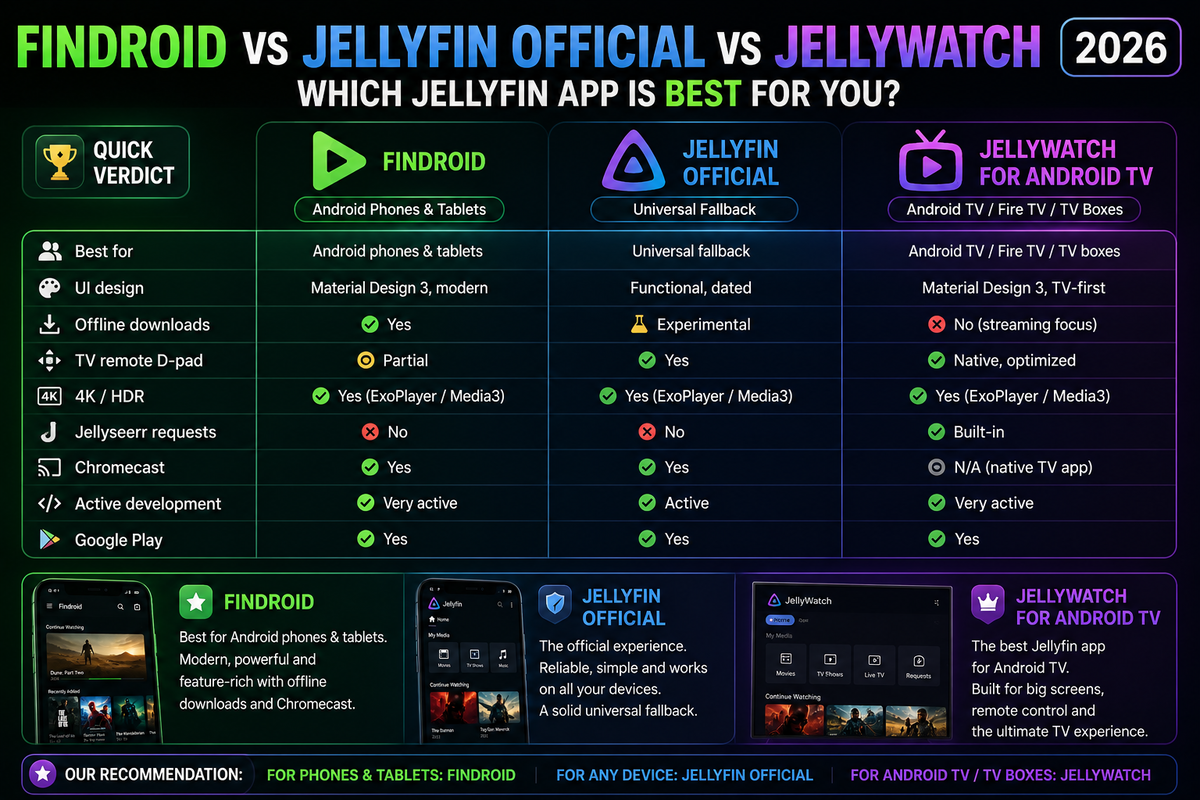
| Feature | Findroid | Official Jellyfin | JellyWatch for Android TV |
|---|---|---|---|
| Best for | Android phones & tablets | Universal fallback | Android TV / Fire TV / TV boxes |
| UI design | Material Design 3, modern | Functional, dated | Material Design 3, TV-first |
| Offline downloads | Yes | Experimental | No (streaming focus) |
| TV remote D-pad | Partial | Yes | Native, optimized |
| 4K / HDR | Yes | Yes | Yes (ExoPlayer Media3) |
| Jellyseerr requests | No | No | Built-in |
| Chromecast | Yes | Yes | N/A (native TV app) |
| Active development | Very active | Active | Very active |
| Google Play | Yes | Yes | Yes |
Phone and Tablet: Findroid vs Official Jellyfin
UI and Design
Findroid uses Material Design 3 with dynamic theming (Material You on Android 12+). The interface feels modern, with smooth animations, proper dark mode, and a clean library grid.
The official Jellyfin app uses an older design language. Functional but visually dated compared to Findroid.
For users sharing their server with non-technical family members, Findroid's polished UI makes a better first impression.
Offline Downloads
Findroid: Full offline download support. Download movies and episodes to your phone for offline viewing.
Official Jellyfin: Offline downloads are marked as experimental. They work but are less reliable than Findroid's implementation.
If offline viewing matters to you, Findroid is the clear choice for phones.
Codec Support and Playback
Both apps use ExoPlayer as the playback engine. Codec support is nearly identical:
| Codec | Findroid | Official |
|---|---|---|
| H.264 | Direct Play | Direct Play |
| H.265/HEVC | Direct Play | Direct Play |
| AV1 | Direct Play (Android 12+) | Direct Play (Android 12+) |
| VP9 | Direct Play | Direct Play |
| SRT subtitles | Yes | Yes |
| ASS subtitles | Yes | Yes |
No meaningful difference in playback capability for phone and tablet use.
Recommendation for phones and tablets: Findroid.
Android TV and TV Boxes: Why JellyWatch for Android TV Wins
If you watch Jellyfin on an Android TV, Chromecast with Google TV, Fire TV, Nvidia Shield, or any TV box, the equation changes completely.
Phones and TV interfaces have fundamentally different requirements:
- TV uses a D-pad remote, not touch
- Navigation must work with 4 directional keys + select
- UI must be readable at 3 meters distance
- Loading speed matters more because TV browsing is leaned-back
JellyWatch for Android TV was built exclusively for this use case.
What Makes JellyWatch for Android TV Different
Real Direct Play with hardware-accelerated ExoPlayer (Media3):
- ExoPlayer with the Media3 stack uses hardware decoders on the device
- Zero unnecessary transcodes triggered by player limitations
- 4K, HDR10, HDR10+, and Dolby Vision on compatible hardware
- TrueHD and DTS:X passthrough to AV receivers
Native remote control navigation:
- Every element reachable with a standard TV remote
- Fast D-pad focus traversal designed from the ground up — not adapted from a phone UI
- Smooth, responsive Jetpack Compose animations
Jellyseerr integration built-in:
- Request movies and TV shows directly from your TV
- Browse and manage pending requests without picking up your phone
Home screen designed for the couch:
- Continue Watching, Next Up, and Recently Added prominently displayed
- Chapters and resume playback work reliably
- Automatic next episode without interaction
Device Compatibility
JellyWatch for Android TV works on:
- Chromecast with Google TV (all generations)
- Nvidia Shield Pro and Shield TV
- Fire TV Stick 4K and 4K Max
- Onn 4K Box and 4K Pro
- Sony, Philips, TCL Android TV sets
- Xiaomi TV boxes
- Any Android TV 8.0+ device
Download JellyWatch for Android TV on Google Play
Which App For Which Screen?
| Screen | Recommended App |
|---|---|
| Android phone | Findroid |
| Android tablet | Findroid |
| Android TV / Google TV | JellyWatch for Android TV |
| Fire TV | JellyWatch for Android TV |
| Nvidia Shield | JellyWatch for Android TV |
| TV box (Chromecast, Onn, etc.) | JellyWatch for Android TV |
| Need offline downloads on phone | Findroid |
| Server administration | JellyWatch admin app |
The Complete Android Jellyfin Setup
For a household with both phones and a TV:
- Findroid on every Android phone and tablet — modern UI, offline downloads
- JellyWatch for Android TV on the TV box — native TV interface, Direct Play, Jellyseerr requests
- JellyWatch admin app on your phone — session monitoring, server health, push notifications
Three apps, all free, covering every screen.
FAQ
Can I use Findroid on an Android TV? Findroid installs on Android TV but is designed for touch screens. D-pad navigation works but the interface is not optimized for the 10-foot experience. JellyWatch for Android TV is the purpose-built alternative.
Does JellyWatch for Android TV support offline downloads? Not currently. JellyWatch for Android TV focuses on streaming quality and TV navigation. For offline viewing on a tablet, use Findroid.
Which app has the best 4K playback on a TV? JellyWatch for Android TV uses ExoPlayer Media3 with full hardware decode. On a Chromecast, Nvidia Shield, or TV box connected to a 4K TV, it delivers the cleanest Direct Play experience with zero unnecessary transcoding.
Is JellyWatch for Android TV the same as the JellyWatch admin app? No. They are separate apps. JellyWatch (admin app) is for server monitoring from your phone. JellyWatch for Android TV is a Jellyfin viewing client for the big screen.
The right tool for each screen.
- Phone/tablet: Findroid on Google Play
- TV box: JellyWatch for Android TV on Google Play
- Server admin: JellyWatch on Google Play


Comments
No comments yet. Be the first to share your thoughts.
Leave a comment