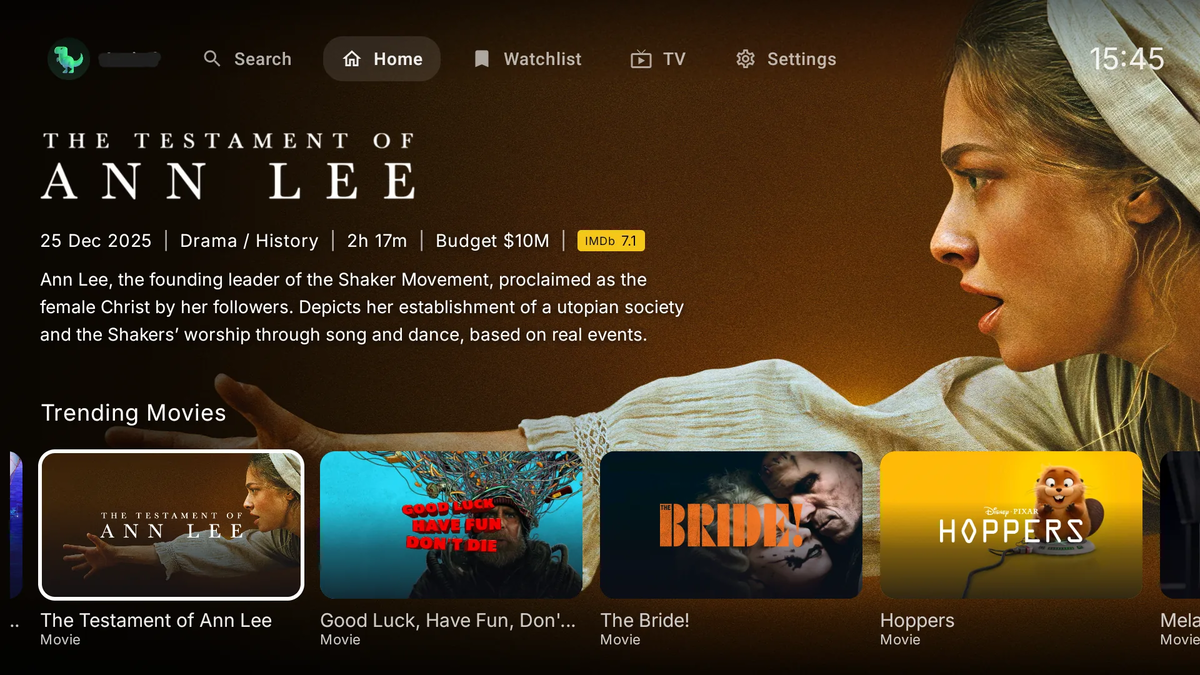
ARVIO: The Open-Source Android TV Media Hub That Unifies Everything (2026)
What if one app on your Android TV could connect to your Jellyfin server, your Plex library, your Stremio addons, your IPTV playlists, your Trakt watchlist, and streaming service catalogs - all in a single, beautiful interface designed for the remote control?
That app exists. It is called ARVIO, and it is free, open source, and available on Google Play right now.
What Is ARVIO?
ARVIO is an Android media hub built from the ground up for the TV form factor. It is not a media server - it is a unified frontend that connects to the services and sources you already use, presenting everything in one cohesive home screen.
No server required. No account required. No ads. No premium tier. Just install and connect your stuff.
- Website: arvio.tv
- Google Play: ARVIO on Play Store
- GitHub: ProdigyV21/ARVIO
- Discord: ARVIO Community
- License: Apache 2.0 (open source)
Why ARVIO Matters for Self-Hosters
If you run a Jellyfin, Plex, or Emby server, you already have dedicated apps for each. But the Android TV experience is fragmented:
- Jellyfin for your local library
- A separate Stremio app for addon-based content
- A separate IPTV app for live TV
- Trakt integration scattered across multiple apps
- No unified "home screen" that brings it all together
ARVIO solves this by acting as a single entry point. You open one app, and everything is there - your Jellyfin library, your Stremio addons, your IPTV channels, your Trakt watchlist, and curated streaming catalogs. All navigable with a D-pad remote.
Core Features
Media Server Integration (Jellyfin, Plex, Emby)
ARVIO connects to your self-hosted media servers as catalog sources:
- Jellyfin - browse your library, play content, sync watch state
- Plex - connect your Plex server alongside other sources
- Emby - full integration as a catalog source
Your server libraries appear as rows on the ARVIO home screen, mixed with other content sources in whatever order you prefer.
Stremio Addons - Native on TV
This is the feature that sets ARVIO apart from every other Android TV app. ARVIO runs Stremio addons natively in a remote-first interface:
- Paste addon URLs directly into ARVIO
- Browse addon catalogs with metadata, posters, and descriptions
- Subtitles from OpenSubtitles integrated
- Provider selection for streams
- No separate Stremio app needed
Built-in metadata sources include Cinemeta, TMDB, and WatchHub. You bring your own addons for streams.
Live TV (M3U and Xtream)
ARVIO includes a full IPTV player:
- Import M3U or Xtream playlists
- Channel grouping and favorites
- EPG (Electronic Program Guide) support
- Mini-player that stays active while you browse
- Category management with hidden categories
No separate IPTV app needed. Live TV lives alongside your movies and shows in one interface.
Trakt Integration (First-Class)
Trakt is not an afterthought in ARVIO - it is a core feature:
- Scrobbling - automatic watch history tracking
- Continue Watching - resume points synced across devices
- Watchlist - your Trakt watchlist appears as a home screen row
- History - full watch history accessible
- Per-profile - each ARVIO profile can link its own Trakt account
Streaming Service Catalogs
ARVIO includes built-in catalog rows for major streaming services:
- Netflix, Disney+, Apple TV+, Prime Video, HBO Max, Hulu, Paramount+, and more
- Genre shortcuts and artwork
- These are discovery catalogs (what is available on each service) - not streams
Useful for browsing what is new on services you subscribe to, then playing via your preferred source.
ARVIO Cloud (Optional)
For multi-device sync without typing passwords on a TV keyboard:
- Pair devices via QR code
- Sync profiles, addons, catalogs, settings, and watch state
- Works across multiple Android TVs
- Completely optional - the app works fully offline
The Player
ARVIO uses ExoPlayer (Media3) with the FFmpeg extension. Codec support is comprehensive:
| Category | Supported formats |
|---|---|
| Video | H.264, H.265/HEVC, VP9, AV1, Dolby Vision |
| Audio | AAC, AC3, EAC3, DTS, DTS-HD, TrueHD, Dolby Atmos |
| Containers | MKV, MP4, WebM, HLS, DASH |
| Subtitles | SRT, VTT, ASS/SSA, PGS |
| Quality | 4K HDR, multi-track audio and subtitle selection |
Passthrough and hardware decode depend on your device and Android audio pipeline - same as any Android TV app.
Supported Devices
ARVIO is designed for the 10-foot experience first:
| Device type | Support level |
|---|---|
| Android TV | Primary - D-pad optimized |
| Google TV (Chromecast, etc.) | Primary |
| Fire TV | Supported (sideload or Play Store) |
| NVIDIA Shield | Supported |
| Android phone | Companion UI |
| Android tablet | Companion UI |
Notably absent: iOS, Apple TV, and LG webOS are not supported. ARVIO is Android-only.
How ARVIO Compares
| Feature | ARVIO | Stremio | Kodi | Jellyfin App | Stock TV |
|---|---|---|---|---|---|
| Built for TV remote | Native | Partial | Skin-dependent | Yes | Yes |
| Stremio addons | Built-in | Native | No | No | No |
| Jellyfin/Plex/Emby | Connected | No | Add-on | Native | No |
| Live TV (M3U) | Built-in | Add-on | Add-on | Free | No |
| Trakt sync | First-class | Add-on | Add-on | Plugin | No |
| Streaming catalogs | 10+ built-in | Limited | Manual | No | Single feed |
| No server required | Yes | Yes | Yes | Needs server | Yes |
| Free and ad-free | Open source | Free | Open source | Free | Ads |
ARVIO occupies a unique position: it combines the addon ecosystem of Stremio, the server connectivity of dedicated media apps, and the live TV capabilities of IPTV players into one unified interface.
Installation
Google Play (Recommended)
- On your Android TV, open the Google Play Store
- Search for ARVIO
- Install (free, no in-app purchases)
- Open and start configuring
The Play Store path gives you automatic updates.
APK Sideload (Fire TV or Direct)
- Download the latest APK from GitHub Releases
- On your device, enable "Install unknown apps" for your file manager
- Transfer and install the APK
- Open ARVIO
From Install to First Stream
The setup takes under 3 minutes:
- Install from Play Store
- Add sources - connect a Jellyfin server, paste a Stremio addon URL, or import an M3U playlist
- Press play - browse, select, watch. Trakt picks up watch state automatically if connected.
Multi-Profile Support
ARVIO supports multiple profiles on a single device:
- Each profile has its own watchlist, continue watching, and watch history
- Profile PINs for access control
- Custom profile avatars (synced via ARVIO Cloud)
- Per-profile Trakt accounts
- Per-profile addon and catalog configuration
Perfect for family TVs where each person wants their own home screen.
Open Source and Privacy
ARVIO is licensed under Apache 2.0. The full source code is available on GitHub for review, forking, and contributions.
Privacy highlights:
- No ads, no analytics, no tracking
- No account required for basic use
- ARVIO Cloud sync is optional and can be deleted at any time
- The app does not host, store, or distribute any media content
- Users are responsible for the sources they connect
Who Should Use ARVIO?
Ideal for:
- Jellyfin/Plex/Emby users who also use Stremio addons and want one app for everything
- IPTV users who want live TV alongside on-demand content
- Cord-cutters who want a unified home screen across multiple sources
- Android TV owners tired of switching between 5 different apps
- Trakt users who want first-class scrobbling and watchlist integration
- Privacy-conscious users who want an open-source, ad-free media hub
Not ideal for:
- Apple TV / iOS users - Android only
- Users who want a media server - ARVIO is a client/hub, not a server
- Users who need transcoding - ARVIO plays streams as-is; transcoding happens on your server
ARVIO + JellyWatch: The Complete Android Stack
ARVIO handles the watching experience on your TV. JellyWatch handles the server administration from your phone. Together they cover both sides:
| Role | App |
|---|---|
| Watch content on TV | ARVIO |
| Monitor server health | JellyWatch |
| Manage Radarr/Sonarr/Seerr | JellyWatch |
| Approve media requests | JellyWatch |
| Track active sessions | JellyWatch |
| Get push notifications | JellyWatch |
ARVIO is for your couch. JellyWatch is for your pocket.
Current Status and Development
As of May 2026, ARVIO is at version 1.9.92 with active development. Recent work has focused on:
- IPTV category handling and large-list navigation
- Watchlist and continue-watching reliability
- Catalog discovery improvements
- Home-server source and catalog integration
- Profile avatar sync
- Mobile and tablet layout fixes
- Player navigation improvements
The project has 74 stars on GitHub and an active Discord community for support and feature requests.
FAQ
Is ARVIO free? Are there ads? Completely free, open source, no ads, no analytics, no premium tier. A Ko-fi link exists for voluntary support but nothing in the app is gated.
Does ARVIO host or stream content? No. ARVIO is a hub that connects to the addons, servers, and playlists you configure. It ships metadata providers (Cinemeta, TMDB) and subtitle providers (OpenSubtitles) but does not host video.
Which devices are supported? Android TV and Google TV are primary (Chromecast with Google TV, NVIDIA Shield, Onn 4K, Sony Bravia, TCL). Android phones and tablets get a companion UI. iOS, Apple TV, and webOS are not supported.
Do I need a media server? No. ARVIO runs entirely on the TV. Server connections (Jellyfin, Plex, Emby) are optional additions.
Can I use ARVIO alongside the official Jellyfin app? Yes. They are independent apps. You might use the Jellyfin app for pure library browsing and ARVIO for the unified experience with addons and live TV.
How do I install on Fire TV? Grab the APK from GitHub releases and sideload it. Enable "Install unknown apps" in Fire TV settings first. The Play Store version also works if your Fire TV has Play Store access.
Is there Dolby Vision and Atmos support? Yes, where the device hardware supports it. ExoPlayer handles DV and Atmos passthrough on compatible Android TV devices.
Getting Involved
ARVIO is open source and welcomes contributions:
- Report bugs: GitHub Issues
- Join the community: Discord Server
- Contribute code: Fork the repo, build with Android Studio + JDK 17
- Support development: Ko-fi link available on the website
Sources
- Official website: https://arvio.tv
- GitHub repository: https://github.com/ProdigyV21/ARVIO
- Google Play Store: https://play.google.com/store/apps/details?id=com.arvio.tv
- Discord community: https://discord.com/invite/bGBBGKFZVh
Running a Jellyfin server behind ARVIO? Monitor it from your phone. Download JellyWatch on Google Play - real-time session monitoring, transcoding diagnostics, and push notifications for Jellyfin admins.
On Emby? Download EmbyWatch on Google Play - the same monitoring experience for Emby servers.


Comments 2
ARVIO replaced 4 separate apps on my Shield Pro. Jellyfin library, Stremio addons, IPTV channels, and Trakt watchlist all in one D-pad-friendly interface. The unified home screen is exactly what Android TV needed.
The IPTV integration with EPG support is surprisingly good for a free open-source app. Channel switching is fast, the mini-player works while browsing, and it sits right next to my Jellyfin library. No more app switching.
Leave a comment